A decision gets made in a meeting. Someone sends a summary by email. Two people discuss the details on WhatsApp. A third person misses the WhatsApp message and asks about it the next day by phone. The project lead updates a spreadsheet. The CEO reads the email summary three days later and asks a question that was already answered in the WhatsApp thread nobody told him about.
Nobody was careless. Nobody dropped the ball. The information simply travelled through too many channels with no rules about which one was the source of truth.
This is the most relatable operational problem we encounter. Every CEO we talk to nods when we describe it. Every team we work with lives it daily. And yet almost nobody has a written communication structure. They have channels. They do not have a system.
Asana's Anatomy of Work Index, based on a survey of over 10,000 knowledge workers, found that workers spend 60% of their time on "work about work" — communicating about tasks, hunting for information, and switching between tools — rather than the skilled work they were hired to do. The problem is not a lack of communication. The problem is too much communication through too many uncoordinated channels, with no agreement on which one matters for what purpose.
This guide helps you audit your communication channels, apply one simple principle, and build a communication blueprint your team can follow starting tomorrow.

Fewer channels with clearer rules will always outperform more channels with no rules.

Why does adding more channels make communication worse?
The instinct makes sense. The team is missing information, so you add a channel. You introduce a chat tool so people stop using email for quick questions. You create a WhatsApp group for urgent updates. You start a weekly meeting so everyone is aligned.
Each channel solves one problem. But together, they create a new one: nobody knows where to look for what.
The email contains the formal decision. The WhatsApp group has the real discussion. The meeting notes (if they exist) have the action items. The chat tool has the quick update that contradicts what was said in the meeting. And the phone call between two people contains the final agreement that nobody else knows about.
The result is not information loss. It is information fragmentation. The information exists. It just lives in six places, and nobody can reconstruct the complete picture without checking all of them.
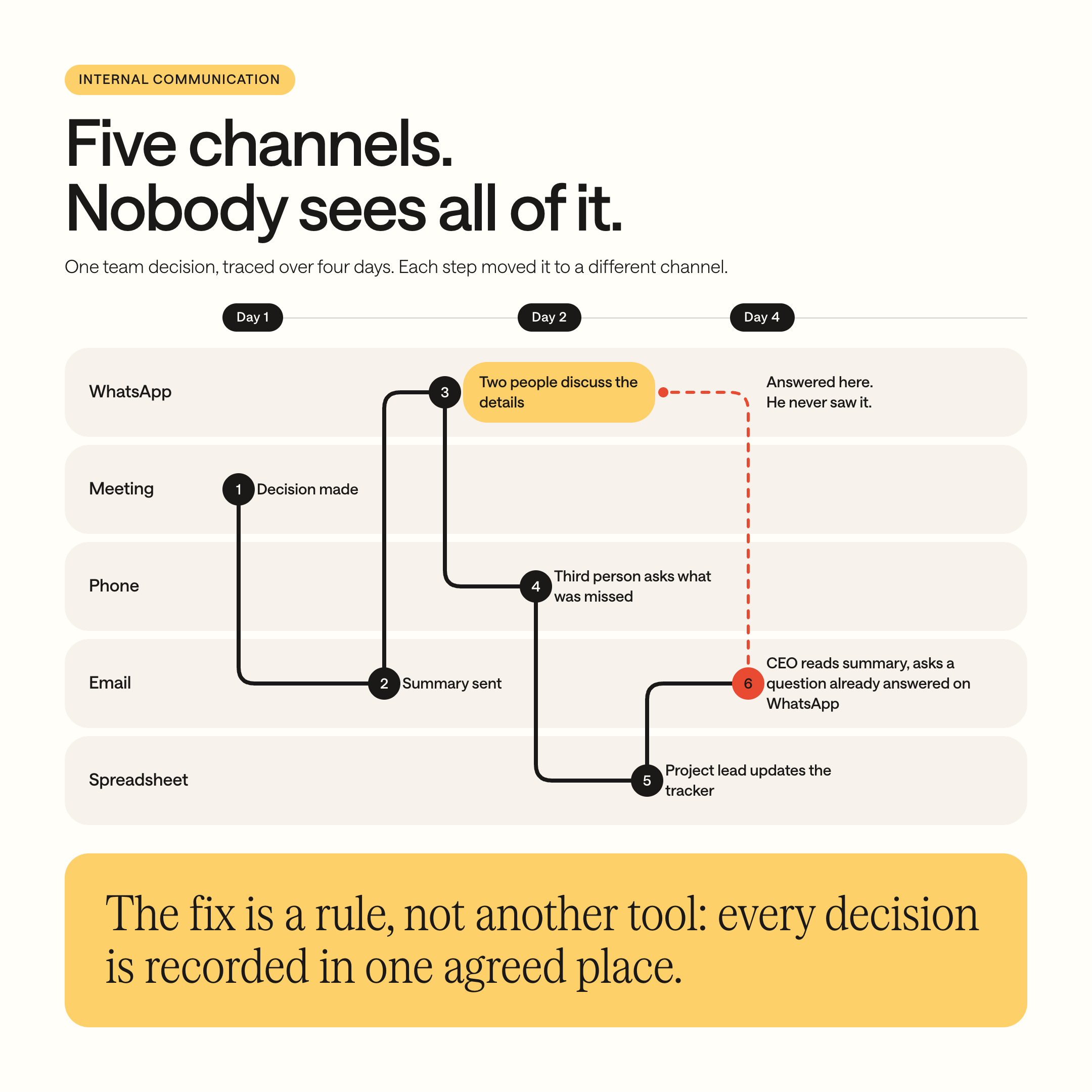
For a team of 20, this fragmentation costs hours every week in "did you see my message?" conversations, duplicate updates, and decisions that get made twice because the first one was invisible to half the team.
The one principle that fixes it: one channel, one job
The fix is not a new tool. It is a rule.
Every communication channel gets one defined purpose. Every purpose has one defined channel.
This means the team knows, without thinking, where to go for each type of communication. Quick questions go to the chat tool. Formal decisions go to email. Status updates go to the project system. Urgent disruptions go to phone. Nothing else.
When a channel has one job, finding information becomes simple. Where was the decision about the client contract? Email. Where is the current project status? Project system. Who is covering the Thursday shift? Scheduling tool. No guessing. No searching. No "did you see my message?"
The principle sounds obvious. In practice, almost no mid-sized business has implemented it.
How many communication channels does my team actually use?
Before you can simplify, you need to see what you have. This audit takes thirty minutes.
Step 1: List every communication channel your team uses
Include everything, even the ones that feel informal:
Email. Phone calls. WhatsApp (personal and group). SMS / text messages. A team chat tool (Slack, Teams, Google Chat). Video calls (Zoom, Teams, Meet). In-person conversations. Meetings (scheduled, recurring, ad hoc). Shared documents or spreadsheets used for updates. Project management tools with comment features. Sticky notes, whiteboards, physical bulletin boards. Any other channel where work-related information gets exchanged.
Most businesses list six to ten channels. Some list more.
Step 2: For each channel, write down what it is actually used for
Not what it is supposed to be used for. What it is actually used for today. Be honest. If WhatsApp is used for "quick questions" but also for "sending client documents" and "discussing project changes," write all three.
Step 3: Look for overlaps
Where is the same type of communication happening through multiple channels? These overlaps are where information fragments. Common overlaps:
Status updates happening in meetings, email, chat, and WhatsApp simultaneously. Decisions being communicated in meetings but then discussed again on WhatsApp. Client information being shared by email but also dropped into chat threads. Approvals happening by email sometimes, by phone other times, by in-person conversation occasionally.
Step 4: Count the channels per communication type
For each type of communication (decisions, status updates, quick questions, urgent issues, file sharing, approvals), count how many channels it flows through. Anything above one is a fragmentation risk.

We built an interactive version of our operational health assessment that includes your communication score and shows you how it compares to other operational dimensions. Takes five minutes. Take the interactive operational health test here →
How to build a Communication Blueprint
Once you have the audit, you can build the blueprint. This is a simple one-page document that answers one question: “which channel do we use for what?”
Here is a template. Adapt it to your actual tools and team.
Quick questions (non-urgent)
Primary channel: Chat tool (Teams/Slack)
Rule: Expect a response within 4 hours. Not for decisions.
Formal decisions
Primary channel: Email
Rule: Every decision is confirmed in writing by email. This is the record.
Project status updates
Primary channel: Project system / dashboard
Rule: Updated by the person responsible. No status chasing by phone or chat.
Urgent disruptions
Primary channel: Phone call
Rule: If it cannot wait 4 hours, call. Everything else uses the channels above.
File sharing
Primary channel: Shared drive / project system
Rule: Files are stored in the system, not sent as email attachments.
Meeting outcomes
Primary channel: Email summary
Rule: After every meeting, one person sends a summary with action items.
Approvals
Primary channel: Email or project system
Rule: Approval requests go to one channel only, with a clear deadline.
Scheduling / availability
Primary channel: Scheduling tool or shared calendar
Rule: Not WhatsApp. Not phone calls at 10pm.
Three rules that make the blueprint stick
Rule 1: If a message is in the wrong channel, redirect it. When someone sends a status update by WhatsApp, the response is: “Thanks, can you put this in the project system so everyone can see it?” Not a lecture. A redirect. After a few weeks, the habit shifts.
Rule 2: The blueprint is visible. Print it. Pin it to the wall. Put it in the onboarding materials. It only works if the team can see it without having to search for it.
Rule 3: Start with one change, not all of them. If you try to restructure every channel at once, the team will revert within a week. Pick the single biggest overlap from your audit (usually “decisions happening in too many places”) and fix that one first. Once it sticks, move to the next.

Communication Blueprint Template
A one-page printable communication blueprint with blank rows to fill in your own tools and rules. Formatted for printing: pin it in the office, include it in onboarding, or share it in your next team meeting.
Thank you! Your submission has been received!
Oops! Something went wrong while submitting the form.
Thank you. Your download should start automatically.
Oops! Something went wrong while submitting the form.
What about meetings?
Meetings are a communication channel, and in most businesses, they are the most expensive one. A one-hour meeting with six people costs six person-hours. A weekly meeting that runs all year costs 288 person-hours. If even a third of that time is unproductive, the business is losing nearly 100 person-hours per year on a single recurring meeting.
Three questions that turn meetings from a time sink into a communication tool:
Does this meeting have an agenda shared in advance? If not, attendees arrive unprepared and the first fifteen minutes are wasted on orientation.
Does this meeting produce documented action items with owners and deadlines? If not, the decisions made in the meeting evaporate within a day. “We discussed it” is not the same as “we decided it and someone is responsible.”
Could this meeting be a written update instead? Status meetings where each person gives a verbal report are the most common candidates for elimination. A shared dashboard or a weekly written update achieves the same result without consuming everyone’s time simultaneously.
Not every meeting needs to be eliminated. Some conversations require real-time interaction. But every meeting should earn its place.
Where AI fits: structured communication is findable communication
An AI assistant that answers team questions or searches company knowledge is only useful if the information it needs to find is stored somewhere structured. If your decisions live in WhatsApp threads, your project updates live in scattered emails, and your meeting outcomes are never documented, no AI can retrieve them.
A communication blueprint does not just help your team today. It creates the infrastructure for AI to be useful in the future. Every decision documented in email, every status update logged in the project system, every meeting summary stored in a shared location becomes searchable, retrievable knowledge.
For the full picture on why structure is the prerequisite for AI: 95% of AI Projects Deliver Zero ROI. Here’s Why, and What to Fix First.
Where to start
Step 1: Run the communication audit. List your channels, map what each one is actually used for, find the overlaps. Thirty minutes.
Step 2: Build the communication blueprint. One page. One channel per communication type.
Step 3: Pick the single biggest overlap and fix it first. Share the blueprint with the team. Redirect when someone uses the wrong channel.
Step 4: After two weeks, review. Is the team following the blueprint for that one communication type? If yes, add the next one.
One channel per job. One job per channel. That alone eliminates more daily friction than most tool purchases.
Want to see what your fragmented communication is costing in real euros? Read next: Your Business Runs on Manual Work. Here’s What That Costs You Every Year.
Ready to map the processes behind your communication flows? Read next: How to Map a Business Process, Even If You Have Never Done It Before
Your Next Step
The problem is not that your team communicates too little. The problem is that information flows through too many channels with no structure. Fewer channels with clearer rules will always outperform more channels with no rules.
You now have the audit, the blueprint template, and a starting point. You can restructure your team’s communication this week.
Communication structure is one dimension of operational health. It connects to how your data is organized, how your processes are documented, and how your tools are connected. Fixing communication in isolation helps. Fixing it as part of a complete operational system changes the business.
If you want your communication, processes, data, and tools working as one system, we start with a structured audit across all operational dimensions. Then a clear blueprint for how information flows through your business. Sprint-based delivery. We stay after the build.
Ready to bring structure to how your business communicates? Book a structured operations call here.
Whether you take this on yourself or hand it to us, we hope this guide helps you turn seven channels into a system.
FAQ
How many communication channels should a business use internally?
Two to three, each with one defined purpose. Most mid-sized businesses use six or more (email, phone, WhatsApp, a chat tool, meetings and in-person conversations) with no rule about which one is for what. The fix is one channel, one job: every type of communication gets exactly one channel, and every channel gets exactly one purpose.
Why do too many communication channels hurt team productivity?
Too many channels fragment information, so people spend their day finding it instead of using it. Asana’s Anatomy of Work Index, a survey of over 10,000 knowledge workers, found that 60% of working time goes to “work about work”: chasing updates, searching for information and switching between tools. The information exists. It just lives in six places at once.
What is a communication blueprint?
A communication blueprint is a one-page document that assigns every type of internal communication to exactly one channel, with one rule for each. Quick questions go to the team chat, formal decisions to email, status updates to the project system and urgent issues to a phone call. It hangs where the whole team can see it.
How do I audit my team’s communication channels?
List every channel your team uses, then write down what each one is actually used for today, not what it is supposed to be used for. Mark every type of communication that runs through more than one channel. Each of those overlaps is where information gets lost. The whole audit takes about thirty minutes.
How do I stop my team from making work decisions on WhatsApp?
Give decisions one official channel, usually email, and redirect every decision that appears anywhere else. A short reply such as “can you put this in the project system so everyone can see it?” works better than a new policy. Fix one overlap at a time, because teams that restructure every channel at once revert within a week.
How much does a recurring internal meeting cost?
A one-hour weekly meeting with six people costs 288 person-hours a year, based on 48 working weeks. If a third of that time is unproductive, the business loses close to 100 person-hours on a single recurring meeting. Status meetings are the first candidates to replace with a shared dashboard or a short written update.
How does communication structure affect AI readiness?
AI can only use information stored in structured, findable places. Decisions buried in WhatsApp threads, updates spread across personal inboxes and meeting outcomes that were never written down are invisible to any AI assistant. A communication blueprint creates the structured record an AI tool needs to answer your team’s questions accurately.
.jpeg)


.jpg)


