A CEO watches a demo. The software is impressive. Tasks that take his team twenty minutes happen in seconds. Data flows between systems without anyone touching it. Reports generate themselves. He buys it.
Six months later, the automation is running. It is fast. It is consistent. And it is producing the wrong output, because nobody fixed the broken process underneath it before they automated it.
This is the most expensive mistake in operational improvement: automating a process that should have been eliminated or redesigned first. You do not get a faster, better operation. You get faster, more consistent chaos.
Deloitte's Global Intelligent Automation Survey, based on 479 executives across 35 countries, identifies the three biggest barriers to scaling automation: integration difficulties (62%), skills gaps (55%), and the inability to change business processes or ways of working (52%). The first two are technology and people problems. The third is the cornerstone of failure: automating processes that should have been redesigned first.
This guide introduces the three-step sequence that prevents those failures: eliminate what should not exist, streamline what remains, then automate what is left. The order is not optional
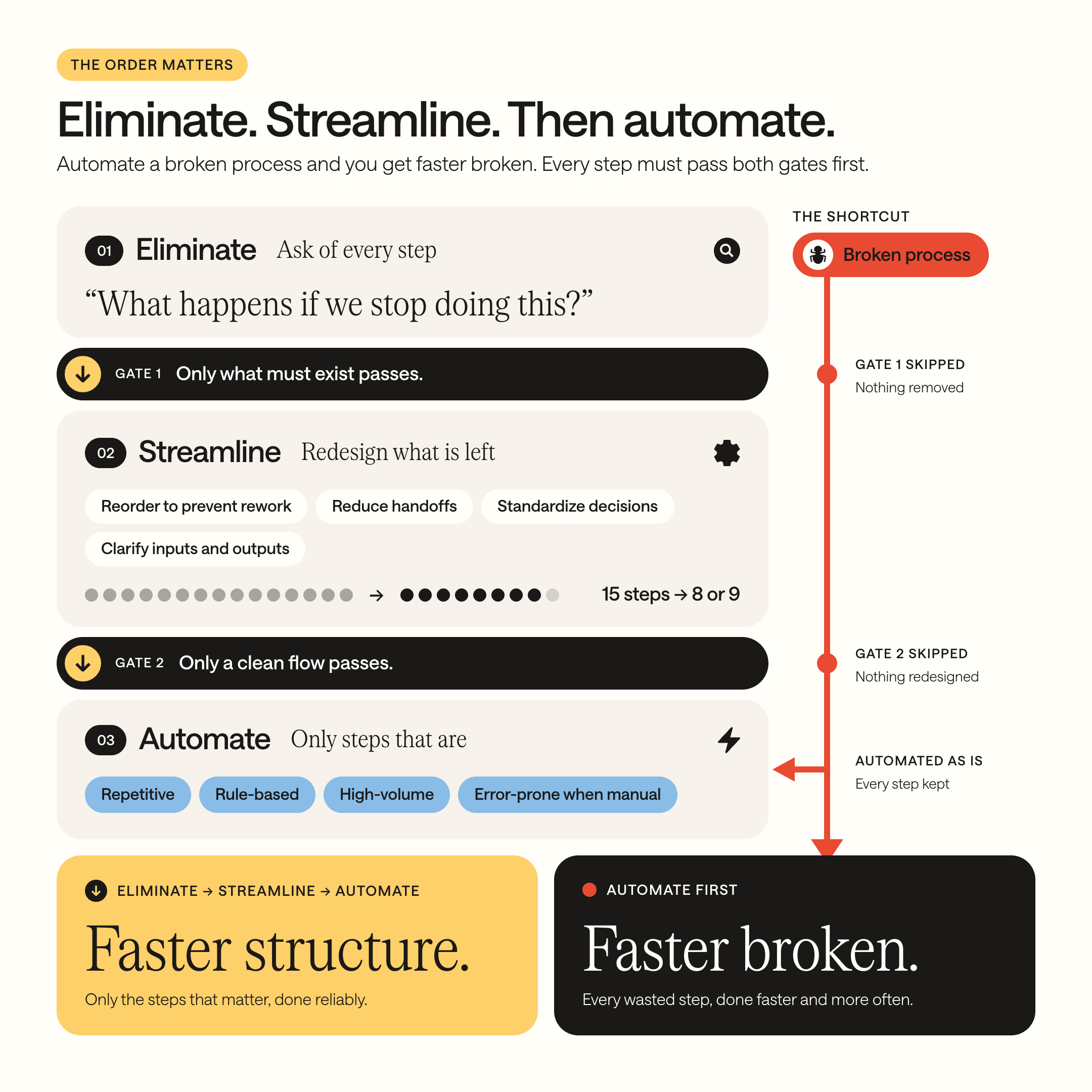

If you automate a broken process, you get faster broken.

Why do most automation projects fail before they start?
The pattern is consistent. A business identifies a painful process. Manual invoicing. Status reporting. Client onboarding. Data entry between systems. The pain is real. The instinct to automate it is natural.
But here is what usually happens. The business automates the process as it currently exists, with all its unnecessary steps, redundant handoffs, and accumulated workarounds. The automation dutifully performs every inefficient step, faster and more reliably than a human, but still inefficiently.
An invoice that required seven data entries across four systems now gets those seven entries done automatically. But nobody asked: why does the same data need to exist in four systems? The automation solved the speed problem. It preserved the architecture problem. And it made the architecture problem harder to fix, because now it is encoded in software instead of living in a person’s habits.
This is what we mean when we say: if you automate a broken process, you get faster broken.
Step 1: Eliminate what should not exist
Before you streamline anything, before you automate anything, ask one question about every step in the process: what happens if we stop doing this?
Not “can we do this faster?” Not “can a tool do this?” The question is: does this step need to exist at all?
Common steps that turn out to be unnecessary:
Approval steps that add no value. An order under €500 requires the CEO’s signature. The CEO signs it without reading it. The signature adds a two-day delay and zero oversight. Remove the step, set a threshold, and give the team authority below it.
Reports nobody reads. A weekly report is assembled manually every Friday afternoon. It takes two hours. It is emailed to six people. Two of them open it. None of them act on it. The report exists because someone asked for it three years ago and nobody cancelled it.
Duplicate data entry. The same client information is entered into the CRM, the invoicing tool, the project tracker, and a shared spreadsheet. Nobody asked why all four need their own copy. The answer is usually: they do not. One source with data flowing to the others would eliminate three entries per client.
Status updates that are already visible. The project lead calls three site supervisors every morning for a status update, then writes a summary email. If the status were entered directly into a shared system by each supervisor, the call, the summary, and the email all disappear.
Elimination is the most powerful step because it removes cost permanently. Every step you eliminate is a step you never need to streamline, automate, train someone on, or maintain. It is the step most businesses skip, because the instinct is to improve, not to remove.
Step 2: Streamline what remains
After eliminating the unnecessary steps, look at what is left. The remaining process is the one worth investing in. Now ask: is this flowing in the right order, through the right people, with the right information at each step?
Streamlining means redesigning the flow for efficiency before adding any technology. Common improvements:
Reorder steps to prevent rework. If step 5 regularly sends work back to step 2 because of missing information, move the information gathering to step 1. The rework disappears without any tool.
Reduce handoffs. Every time work passes from one person to another, information can get lost and delays can occur. Can two steps be combined? Can one person handle what currently requires three? Not by adding work, but by removing the transfer.
Standardize decisions. If step 3 is “the project lead decides based on experience,” document the decision criteria. When the rules are clear, the decision can be made by anyone, not just the person with the experience. This reduces person dependency (see Guide 4 and Guide 7).
Clarify inputs and outputs. For every step, define: what does this step receive, and what does it produce? When the inputs and outputs are clear, the handoff between steps becomes reliable instead of improvised.
Streamlining often reduces a 15-step process to 8 or 9 steps. The remaining steps are cleaner, faster, and less dependent on specific people. Now they are ready for automation.
Step 3: Automate what is left
Only now, after elimination and streamlining, does automation earn its place.
The process is clean. The steps are necessary. The flow makes sense. Now you can ask: which of these remaining steps are repetitive, rule-based, and identical every time?
Those are your automation candidates. They share four characteristics:
Repetitive. The task happens frequently enough that automating it saves meaningful time. A task done once a month is rarely worth automating. A task done fifty times a week almost always is.
Rule-based. The task follows a clear “if this, then that” logic. If the invoice is approved, send it to the client and log it in the accounting system. If the contract is signed, create a project folder with these five subfolders. No judgment required, just execution.
High-volume. The task handles enough volume that manual execution creates a real bottleneck. Processing five invoices a day is manageable. Processing fifty is not.
Error-prone when done manually. The task involves data transfer, calculation, or formatting where human error is common. If your team regularly catches (or misses) mistakes in this step, automation removes the error source entirely.

How to design an automation on paper first
Before you choose a tool, describe the automation in plain language:
Trigger: What event starts the automation? (A form is submitted. An invoice is approved. A status changes.)
Action: What happens automatically? (An email is sent. A record is created. A file is moved. A notification goes out.)
Condition: Are there any rules? (Only if the amount is above €1,000. Only for clients in Austria. Only on weekdays.)
Expected result: What does the output look like? (The client receives a confirmation email within 5 minutes. The project folder contains five subfolders named correctly.)
If you can describe all four clearly, the automation is ready to build. If you cannot, the process needs more streamlining first.

We built an interactive version of our operational health assessment that includes your automation readiness score. Takes five minutes. Take the interactive operational health test here →
What is the correct order for process improvement?
The three-step sequence (eliminate, streamline, automate) sits inside a larger hierarchy that governs all operational improvement:
Structure first. Clean data, documented processes, clear roles. This is the foundation. Without it, everything built on top is unstable. Guides 1 through 8 in this library cover the structural foundation.
Automation second. Once the structure is solid, automate the repetitive, rule-based tasks. That is this guide.
AI third. Once the data is clean, the processes are documented, and the basic automations are running, AI can add intelligence on top. Pattern recognition. Content generation. Predictive insights. Decision support. But AI built on messy data and undocumented processes produces unreliable results. The hierarchy is not a preference. It is a dependency.
Deloitte's finds that organizations scaling intelligent automation see payback periods drop from 15 months (early implementers) to 9 months (mature scalers) — but only when the underlying processes are documented and redesigned first. Automating chaos produces faster chaos. Automating structure produces faster structure.
For the complete picture on why AI depends on this hierarchy: 95% of AI Projects Deliver Zero ROI. Here’s Why, and What to Fix First.
Where to start
Step 1: Pick one process. The one you mapped in Guide 6 or the one with the most bottlenecks from Guide 7.
Step 2: Walk through every step and ask: “What happens if we stop doing this?” Eliminate what you can.
Step 3: Redesign the remaining flow. Reorder, reduce handoffs, standardize decisions, clarify inputs and outputs.
Step 4: Identify the automation candidates using the four criteria (repetitive, rule-based, high-volume, error-prone).
Step 5: Design the first automation on paper: trigger, action, condition, expected result.
One process, cleaned and automated. That alone delivers more value than a dozen tool purchases. And it gives you a template to repeat across every other process in the business.
Want to calculate what this specific process costs you annually? Read next: Your Business Runs on Manual Work. Here’s What That Costs You Every Year.
Your Next Step
The order matters more than the tools. Eliminate first, streamline second, automate third. Businesses that follow this sequence get lasting results. Businesses that skip to automation get fast, expensive, and fragile systems that encode the very problems they were meant to solve.
You now have the sequence, the criteria, and the design method. You can apply it to your first process this week.
Eliminating steps requires courage, because someone created them for a reason. Streamlining requires process expertise. Automating requires technical skill. Doing all three across an entire business takes months of focused work.
If you want your processes eliminated, streamlined, and automated in the right order, we start with a structured process audit, build a clear roadmap of what to cut, redesign, and automate, and then deliver it sprint by sprint. We stay after the build.
Ready to stop automating chaos and start building structure? Book a structured operations call here.
Whether you take this on yourself or hand it to us, we hope this guide changes the question from “what should we automate?” to “what should we eliminate first?”
FAQ
What happens when you automate a broken business process?
You get faster, more consistent chaos. Automation encodes whatever is underneath it, including unnecessary steps, redundant handoffs, and accumulated workarounds. A process with 15 steps that should have 8 becomes a permanently automated 15-step workflow that is now harder to change because it is encoded in software. Over 80% of automation failures have nothing to do with the technology (2am.tech).
What is the correct order for improving business processes?
Eliminate first: remove steps that should not exist (approvals nobody reads, reports nobody acts on, duplicate data entry). Streamline second: redesign the remaining flow for efficiency; reorder steps, reduce handoffs, standardize decisions. Automate third: apply technology only to what is left, targeting tasks that are repetitive, rule-based, high-volume, and error-prone when done manually. The sequence is a dependency, not a preference.
How do I identify which process steps to eliminate?
Ask one question about every step: “What happens if we stop doing this?” Common elimination candidates include approval steps where the approver signs without reviewing, weekly reports that nobody acts on, data that is re-entered because two systems were never connected, and status calls that would be unnecessary if the information were visible in a shared dashboard.
Where does AI fit in the process improvement hierarchy?
AI sits at the top of a three-level dependency: structure first (clean data, documented processes, clear roles), automation second (repetitive, rule-based tasks handled by systems), AI third (pattern recognition, content generation, prediction applied to a structured foundation). AI built on messy data produces unreliable output. AI applied to undocumented processes automates the wrong things. The hierarchy is not a preference; each level depends on the one below it.